Describe and analyse a photo with AI
Upload a picture and ask a question in words. The AI describes what is in the photo, reads the text, identifies a plant or an object and answers to the point. It is a text scenario, so it works without paying.
The Starter plan is free: 30 units of energy cover dozens of questions about photos. After sign-up the chat opens with your picture and question.
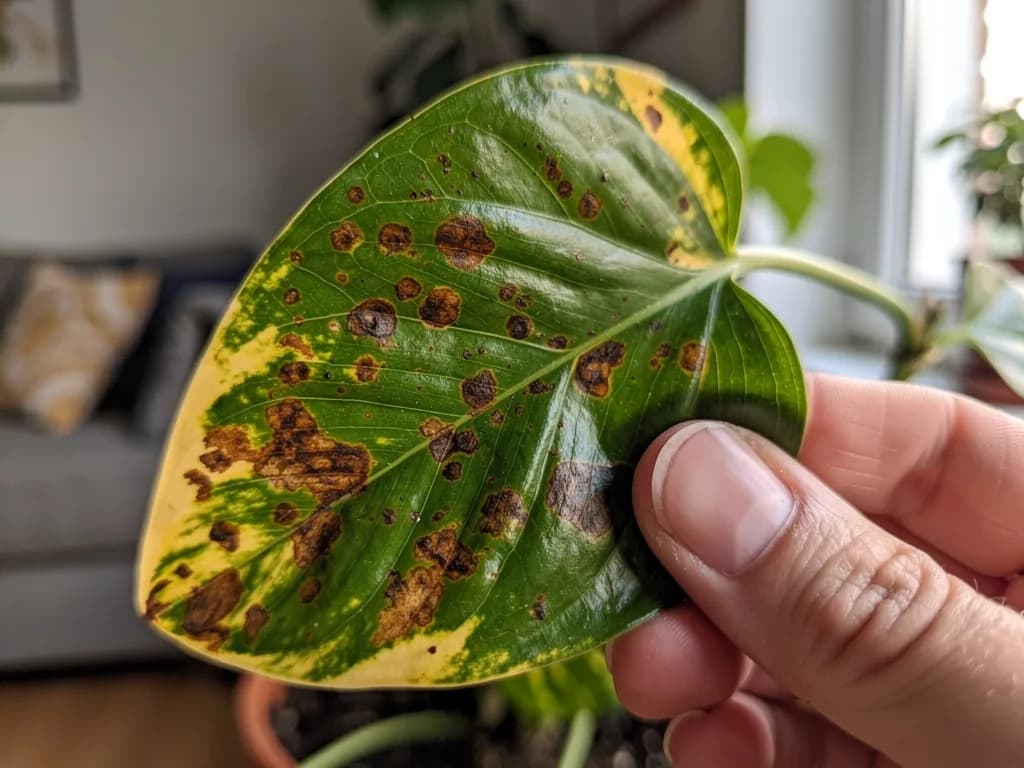
What plant is this and why did spots appear on the leaves?
It looks like a variegated philodendron: a large heart-shaped leaf with yellow-green streaks; from one leaf it is easy to mistake for a monstera. Brown spots with a yellow halo most often mean overwatering and water standing in the pot. Let the top 3–4 cm of soil dry out, check the drainage and move the plant away from the radiator.
Help with a photo in four situations
The same chat describes pictures, reads documents and answers questions about whatever is in the frame. Here is where it saves the most time.
Students
Take a photo of a textbook page, a lecture slide or a diagram on the board and ask: “Explain what is shown here” or “Write out the definitions”. The AI retells the material in its own words and answers follow-up questions.
For problems to solve — “Solve a problem from a photo”Blind and visually impaired people
Ask: “Describe the photo in detail: who and what is in it, the colours, what is written”. The AI describes the composition, objects, text on signs and packaging, reads menus and bills. The answer comes as text that the phone’s screen reader reads aloud.
Shoppers
A photo of a label, ingredients or a price tag in a shop: “Is there gluten here?”, “Which of these is sugar under another name?”, “What is the price per kilo if the tag shows the price for 400 g?”. You can also find out what a part in front of you is and what it is called.
Travellers
A menu in an unfamiliar language, a sign in the metro, instructions on a ticket machine, a monument with no plaque. Upload the photo and ask “Translate and tell me which of these has no meat” or “What is this building and what is it known for”. The AI translates the text and gives a short note.
Recognise text from a photo and work with it right away
A regular OCR tool returns the lines and stops there. Here the text lands in the chat, and you can do anything with it: translate, shorten, turn a scanned table into a list, find the penalty clause in a contract.
- Printed text, chat screenshots, slides
- Recognised almost without errors.
- Handwriting
- Legible handwriting is read; the AI may mix up individual words, so ask it to flag the doubtful places.
- Tables
- Write “Rewrite the table as text, columns separated by commas” to move the data into a document.
- Several pages
- Upload them one at a time and ask to “continue in the same format”.
One question about a photo usually costs 1 unit of energy. The free Starter plan has 30.
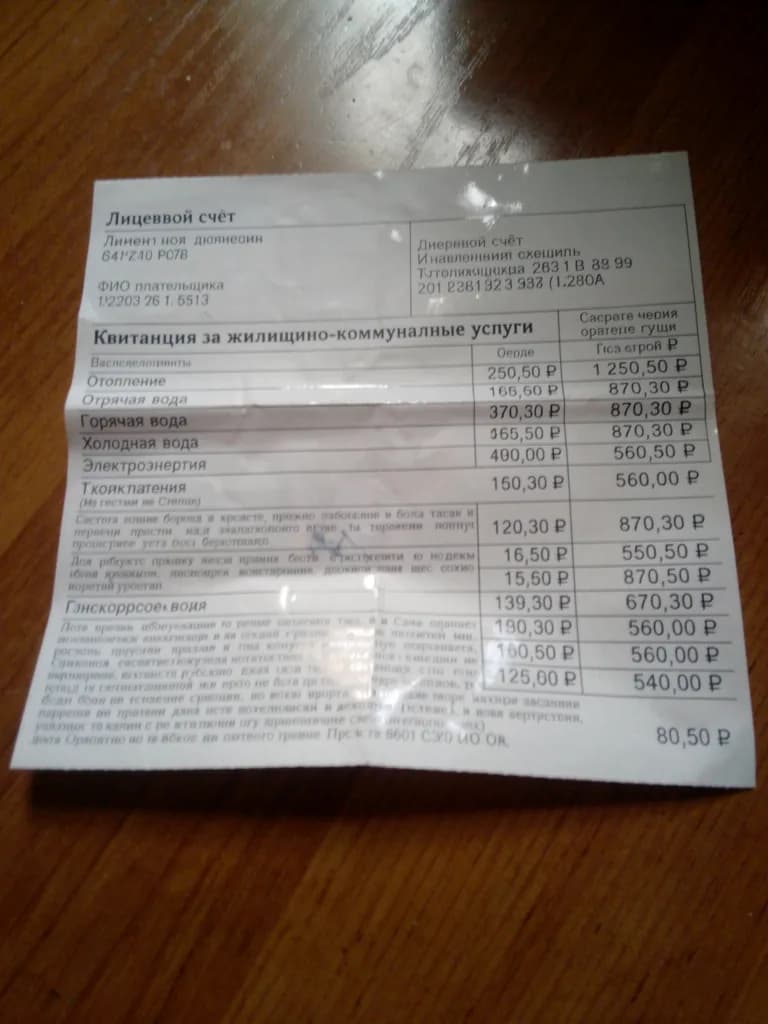 Photo
Photo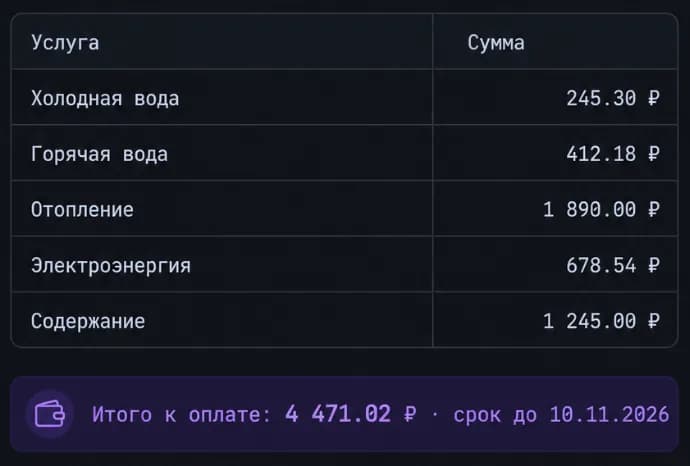 Answer
What to write in the chat to get a precise answer
The more specific the question, the more useful the answer. Compare “what is this?” with “what part is this and what equipment does it fit?”.
- A photo of an unfamiliar object, part or insect
- «Identify what this is and what it is properly called»
- The name, 2–3 features the AI recognised it by, and what a similar object might be
- A screenshot of an error, a chart, a table
- «Explain what is shown here in simple words»
- A summary and a conclusion: what the peak on the chart means, what the error says
- A photo of a room, an interior, clothes
- «Describe the style and suggest what to add»
- A description of the style and a list of ideas
- An image for a website or an article
- «Write alt text up to 125 characters and a caption»
- A short alt without the word “image”, a caption in the right tone
- Several similar photos
- «How do these two pictures differ?»
- A point-by-point list of differences: colour, position of objects, text
What the AI does not do with photos
It does not diagnose
From a photo of a mole, a rash or an X-ray the AI can describe what it sees and suggest which doctor to see, but that is not a medical diagnosis. A doctor decides on treatment.
It does not recognise people
Requests like “find who this is from the photo” and “tell the age from the photo” work only partly: the AI describes appearance and a rough age group, but will not name the person or find their profile.
It can get details wrong
Small or blurry text, rare plant varieties, similar device models. If the answer matters, ask the AI to rate its confidence and retake the shot closer and in good light.
Describe a photo with AI for free
Photo analysis runs on text models, so it is part of the free Starter plan. Paid plans are for lots of questions or when you need images.
Starter
0 ₽, no card
30 units of energy. Photo descriptions, text recognition, translation and answers about a picture — about 1 unit per question. Enough to go through several documents or identify a dozen plants.
All plansLite
₽690 a month
150 units of energy. For daily work with documents and photos, plus image generation — from 1 unit per image. Then there are Basic at ₽990 and Premium at ₽2,290.
Get LiteFAQ
Is describing a photo with AI really free?
Yes. You only need to sign up. The Starter plan has 30 units of energy, and a question about a photo costs about one. You pay only for image generation or when the energy runs out.
Can it tell from a photo where it was taken or what the thing is?
The AI usually identifies well-known buildings, landmarks, device models and animal breeds by their features. It is not a search across a photo database: if the object is rare, the answer is descriptive, with a note on confidence.
Which files can I upload?
JPG, PNG, screenshots and phone photos. If the text is small, shoot closer or upload a crop separately: recognition is more accurate that way.
Can I ask several questions about one photo?
Yes, the picture stays in the dialogue context. First “what plant is this”, then “how should I water it”, then “pick a pot”: each answer takes the photo and the previous messages into account.
What if I need to change the photo, not describe it?
That is image generation: replacing the background, removing objects, improving quality. It is available on plans from Lite at ₽690; see the photo editor page for more.